
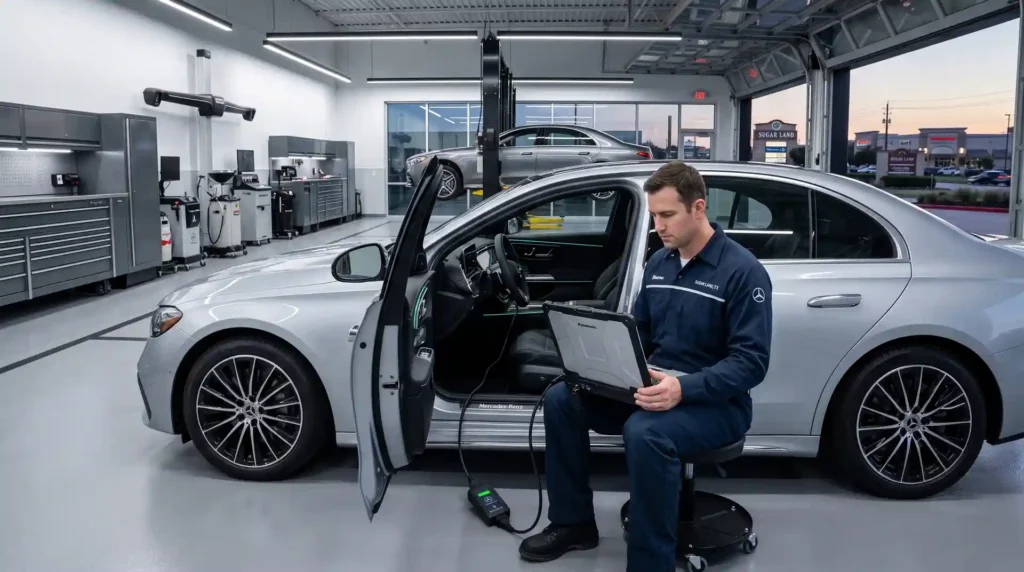
You are driving down Highway 6 in Sugar Land on a humid afternoon when an amber warning light suddenly illuminates your dashboard. Your luxury vehicle enters limp-home mode, leaving you stranded with reduced engine power.
You head to a local auto parts store to plug in a generic code reader, but it returns a blank screen or a vague error code. Modern German engineering requires much more than a standard handheld unit.
To perform a complete, factory-level health check on your luxury vehicle, you need the Mercedes Star diagnostic tool.
The quick answer is that the Mercedes Star Diagnostic Tool, often called the Mercedes SDS or MB Star Diagnostic system, is the official dealer-level hardware and software suite. It combines a specialized hardware interface called a multiplexer with factory software (Xentry and DAS) to read every electronic module, perform bi-directional testing, and execute SCN coding across your vehicle’s digital network.
Let us explore how this factory Mercedes-Benz diagnostic tool works, why standard code readers fall short, and what it takes to troubleshoot your car accurately.
Table of Contents
ToggleWhat is the Mercedes Star Diagnostic Tool?
The Mercedes Star Diagnostic Tool is the benchmark system designed specifically by Daimler for servicing Mercedes-Benz, Smart, and Maybach vehicles.
Unlike universal handheld units, this mb star diagnostic setup delivers complete access to every factory control unit in your chassis.
The Components: Multiplexer, Laptop, and Software
A complete mb star diagnostic system consists of three core components working together:
- The Multiplexer (VCI): The physical adapter (such as an SD Connect C4, C5, or OEM C6) that plugs into your car’s OBD-II port.
- The Diagnostic Laptop: A heavy-duty laptop running specialized 64-bit operating systems configured for German automotive software.
- The Software Suite: Factory applications including Xentry Diagnostics, DAS (Diagnostic Assistance System), WIS (Workshop Information System), and EPC (Electronic Parts Catalog).
How SDS Differs from Generic OBD2 Scanners
A standard scanner for Mercedes bought at a big-box store only communicates with basic OBD-II emissions protocols.
The factory Mercedes SDS accesses proprietary Controller Area Network (CAN) bus protocols.
This enables the Star diagnostic tool to talk to your transmission, brake system, seat sensors, and climate control modules simultaneously.
Why Basic Code Readers Fail on Modern Mercedes Vehicles
When major Mercedes problems occur, basic handheld code readers often leave car owners confused.
Understanding why consumer tools fail helps you avoid misdiagnosing complex issues.
Limited Module Access Across CAN Bus Networks
Modern luxury vehicles house anywhere from 30 to over 100 individual electronic control units.
A standard Benz scanner can only communicate with the primary engine control module (ECM).
If your air suspension sags or your traction control fails, a generic Mercedes scan tool cannot pull data from those specific sub-modules.
Missing SCN Coding and Live Bi-Directional Testing
Reading a diagnostic trouble code is only half the battle during a repair.
When you replace a faulty component, the new part requires Software Calibration Number (SCN) coding to pair with your security gateway.
A standard Mercedes car diagnostic tool lacks the software architecture needed to write fresh coding strings or actuate individual solenoids for active component testing.
Key Capabilities of the MB Star Diagnostic System
The factory Mercedes-Benz Star diagnostic system provides total command over your vehicle’s electronic infrastructure.
In-Depth Fault Reading and Guided Troubleshooting
When you run a scan with an mb star diagnostic tool, the software does not just list error codes.
It launches guided troubleshooting routines through Xentry and DAS.
The software walks the technician through step-by-step wiring tests, voltage checks, and sensor verifications to pinpoint the exact root cause.
Component Actuation and Calibration
Want to verify if your cooling fan or fuel pump is functioning?
The Star Mercedes scanner lets technicians manually command individual parts to switch on or off directly from the laptop keyboard.
It also calibrates complex mechanical systems, such as zero-point steering angle sensors and clutch contact points.
SCN Online and Offline Programming
When installing replacement control modules, software flashing is mandatory.
The Mercedes-Benz Star diagnostic hardware establishes a secure pass-through connection to update ECU firmware.
This capability ensures replacement modules align perfectly with your car’s original factory build sheet.
Step-by-Step Diagnostic Guide Using a Mercedes Star Diagnostic Tool
Using a factory Mercedes diagnostic tool requires precise operational steps to avoid software corruption or voltage drops.
Step 1: Secure Vehicle Power and Connect the Hardware
Hook a steady, high-amperage battery maintainer up to your vehicle’s battery terminals.
Plug the Mercedes-Benz Star Scanner multiplexer directly into the 16-pin OBD-II port under the steering column.
Connect the multiplexer to your diagnostic laptop using an Ethernet cable or dedicated Wi-Fi link.
Step 2: Establish Xentry System Communication
Switch your vehicle ignition key to Position 2 without starting the engine.
Launch the Xentry software on your Mercedes Star diagnostic system laptop.
Select your chassis code manually or let the software read your Vehicle Identification Number (VIN) automatically.
Step 3: Run a Comprehensive Control Unit Scan
Initiate a full vehicle quick-test across all digital network buses.
The Mercedes-Benz diagnostic scanner will query every installed control unit in sequence.
Modules will display as green (no faults), yellow (stored historical codes), or red (active current errors).
Step 4: Interpret Live Data and Fault Memory
Click into specific fault codes to view freeze-frame environmental data recorded when the error occurred.
Review live sensor values—such as rail pressure or mass airflow—displayed in real-time graphs.
Execute guided diagnostic tests to confirm whether the issue stems from a bad sensor or a broken wiring harness.
Hardware Generations: Star SD Connect C4 vs. C5 vs. C6
Choosing the right hardware interface impacts connection speeds and vehicle model coverage.
| Feature / Hardware Generation | SD Connect C4 | MB Star C5 | OEM Xentry VCI C6 |
| Primary Vehicle Years Supported | 1996 to 2018 | 2000 to 2020 | 2010 to Present |
| Communication Protocols | K-Line, CAN Bus | CAN Bus, DoIP (Limited) | Full DoIP (Diagnostics over IP) |
| DoIP High-Speed Flashing | External Adapter Needed | Partial Support | Native High-Speed Support |
| Wireless Connectivity | Wi-Fi / LAN | Wi-Fi / USB | Wi-Fi / USB |
| Hardware Durability | Heavy-Duty Rubber Casing | Plastic Housing | Compact Aluminum VCI |
Comparing Diagnostic Tools: Basic Scanner vs. MB Star Diagnostic System
Not every owner needs a full factory setup, but knowing tool limits prevents wasted time during repairs.
| Diagnostic Feature | Budget OBD2 Reader ($30–$80) | Mid-Tier Handheld ($150–$300) | Factory MB Star System ($1,200+) |
| Reads Engine Check Lights | Yes | Yes | Yes |
| Accesses ABS / SRS / Airbag | No | Most Models | Yes (100% Coverage) |
| Live Sensor Data Graphing | Basic Engine Only | Select Systems | Full Multi-Module Graphs |
| Bi-Directional Component Tests | No | Rare | Yes (All Actuators) |
| SCN Coding & Module Flashing | No | No | Yes (Factory Level) |
| Guided Troubleshooting Trees | No | No | Yes (Integrated WIS/DAS) |
Diagnostic Safety & Urgency Severity Matrix
Some diagnostic codes allow you to drive to a workshop, while others demand immediate shutdown to prevent engine failure.
| Identified Fault Code Category | Danger Level | Potential Mechanical Impact | Required Action |
| Misfire with Flashing CEL | Severe | Catalyst destruction, unburnt fuel wash | Stop driving immediately; tow car |
| Low Oil Pressure Warning | Critical | Complete engine seizure within seconds | Turn off engine instantly |
| Airmatic Pressure Loss | Moderate | Vehicle drops onto bump stops | Drive slowly to local shop |
| Evaporative Emissions Leak | Minor | Increased emissions, slight mileage loss | Safe to drive; schedule check |
| ABS / Wheel Speed Sensor Error | Moderate | Traction control and ABS disabled | Drive carefully; avoid sudden stops |
💡 Pro Tip: Maintain Battery Voltage During Scans
Never launch a full system scan with your Star diagnostic system without a clean power support unit attached. If vehicle battery voltage drops below 12.2 volts while communicating with the central gateway, modules will drop offline and trigger dozens of false communication errors across your scan report.
Common Pitfalls to Avoid When Buying or Using Mercedes Diagnostic Equipment
Investing in diagnostic hardware requires caution, as low-quality equipment can damage sensitive car electronics.
- Buying Cheap Clone Multiplexers Without DoIP: Cheap online knockoffs often lack Diagnostic over Internet Protocol (DoIP) chips. Without DoIP, you cannot flash firmware or code command systems on vehicles built after 2016.
- Clearing Codes Before Recording Freeze-Frame Data: Clearing fault memory right away erases key diagnostic context. Always save a complete PDF diagnostic log before clearing codes so your technician can analyze intermittent issues.
- Attempting SCN Coding on an Unstable Wi-Fi Connection: Interrupting a firmware update due to a weak Wi-Fi signal can brick an expensive control module. Always use a wired LAN cable during active coding.
💡 Pro Tip: Utilize DAS Simulation Mode
If you are learning how to use Mercedes Star diagnostic software, launch the built-in DAS or Xentry Simulation mode on your laptop. This tool lets you practice navigating menus, reviewing guided troubleshooting steps, and studying system wiring diagrams without connecting to a live vehicle.
Cost Breakdown: Mercedes-Benz Star Diagnostic Tool Price vs. Professional Service
Understanding the Mercedes-Benz Star Diagnostic Tool price helps you decide whether to buy equipment or visit a local repair facility.
| Diagnostic Option | Initial Hardware / Service Cost | Recurring Annual Costs | Best Use Case |
| DIY Star Diagnostic System Setup | $1,200 – $3,500 | $500 – $1,200 (Software Updates) | Enthusiasts and specialized garages |
| Mid-Range Mercedes Scanner Tool | $180 – $450 | $0 – $150 (Annual Updates) | Home mechanics doing routine fixes |
| Professional Shop Diagnostic Fee | $120 – $200 per visit | None | Owners seeking guaranteed fixes |
Evaluating your long-term repair goals will show whether investing in hardware or trusting a local specialist fits your budget.
If you are budgeting for broader maintenance, reviewing your overall Mercedes inspection cost helps keep routine services predictable.
How Sugar Land Roads and Weather Impact Vehicle Electronics
Driving in Sugar Land and around the Greater Houston area subjects your luxury vehicle to intense environmental stress.
Summer heat waves drive under-hood temperatures extremely high, degrading delicate solder joints inside control modules over time.
High humidity levels also cause oxidation on electrical pin connectors located under chassis panels.
When moist air damages wheel speed sensors or ride height linkages, a Mercedes car diagnostic tool helps isolate whether you have a bad sensor or a corroded wiring connector.
Furthermore, driving over uneven asphalt along I-69 stresses active suspension systems.
A dedicated scanner for Mercedes-Benz models allows local technicians to recalibrate height sensors precisely so your ride stays smooth and level.
Frequently Asked Questions
Can I run Xentry Star Diagnostic software on any standard laptop?
You can run pass-through software on standard laptops with a 64-bit Windows OS, but full dealer-level setups require specific Panasonic Toughbook models or rugged laptops configured with dedicated serial ports and high-capacity SSDs.
What is the difference between DAS and Xentry in a Mercedes star diagnostic tool?
Xentry is the modern software interface used for vehicles produced from roughly 2004 to the present. DAS (Diagnostic Assistance System) is the legacy software module embedded within Xentry that handles older models built between 1996 and 2005.
Is SCN online coding required for every repair?
No, basic service resets, code reading, and simple sensor recalibrations do not require online SCN coding. SCN coding is only mandatory when replacing security-related control modules, updating ECU firmware, or retrofitting factory options.
Why is my aftermarket scanner unable to communicate with my Mercedes transmission?
Most generic code readers only query the main engine ECU via standard OBD-II channels. The Electronic Transmission Control (ETC) module operates on a dedicated CAN bus line that requires a specialized Mercedes-Benz diagnostic scanner to access.
How much does a professional Mercedes Star Diagnostic scan cost at a local shop?
A professional diagnostic scan using genuine Mercedes diagnostic equipment typically costs between $120 and $200 at an independent European auto repair facility in the Sugar Land area.
Get Factory-Grade Diagnostic Precision for Your Luxury Vehicle
Your Mercedes-Benz represents world-class engineering, elegant styling, and advanced automotive technology.
When warning lights appear, you should not have to guess what your vehicle needs or rely on limited code readers that miss critical technical data.
Using factory-grade diagnostic hardware ensures every module, sensor, and circuit is evaluated with complete mathematical precision.
If your vehicle is showing warning lights or suffering from complex electrical issues, bring it to the experienced team at Crown Auto Repair & Collision in Sugar Land, TX.
Schedule your comprehensive diagnostic appointment online today to let our certified technicians restore your luxury ride to peak factory performance.